EM MEASUREOD® · SYSTEM CONNECTION

Connect the optical measurement system, computer, and server.

This guide shows the main equipment, cable responsibilities, and network requirement for a typical EM MeasureOD® installation.

SYSTEM OVERVIEW

EM MeasureOD® connection path

Illustrative setup; the exact Keyence head and fixture depend on the application.
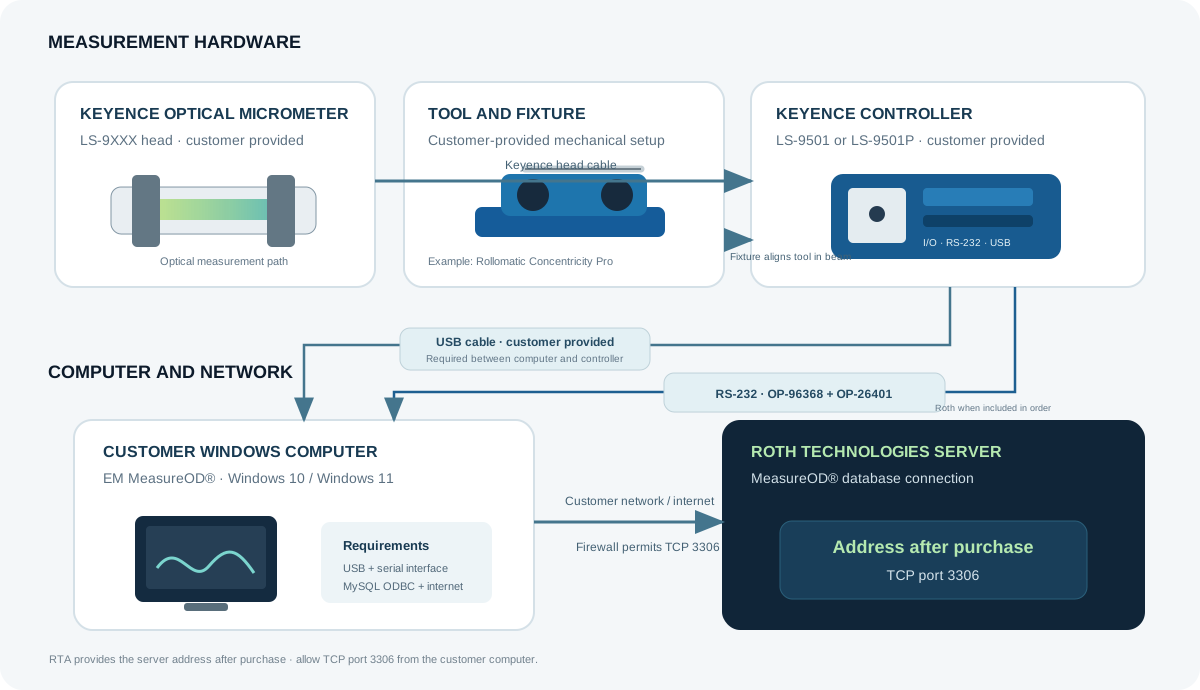
Connection diagram: Keyence LS-9XXX optical micrometer and customer-supplied Rollomatic fixture connect to LS-9501 or LS-9501P controller, then via USB and RS-232 to the customer computer; the computer connects to the MeasureOD server using TCP port 3306.
Use the product-specific connection cables and compatible fixture for your selected configuration.

CUSTOMER-PROVIDED EQUIPMENT

Measurement hardware and computer

  • Keyence LS-9501 or LS-9501P controller and compatible LS-9XXX optical micrometer head.
  • Windows 10 or Windows 11 computer with an available USB port and serial connection. A compatible USB-to-serial adapter may be used when needed.
  • USB cable between the computer and controller.
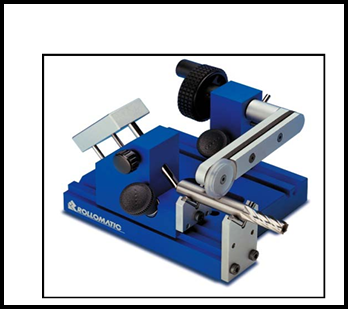
  • Mechanical fixture and tool alignment. The image shows a Rollomatic Concentricity Pro as an example; the customer purchases the fixture separately.
Rollomatic Concentricity Pro manual fixture for rotating cutting tools
Rollomatic Concentricity ProExample customer-supplied fixture. Purchased separately from Rollomatic.

CABLES AND NETWORK

Controller communication and server access

  • USB: required between the computer and Keyence controller; supplied by the customer.
  • RS-232: connect the computer to the controller using the OP-96368 cable with the OP-26401 9-pin conversion adapter. Roth supplies the serial cable/adapter only when included in the order or quotation.
  • MySQL ODBC: install the required ODBC driver on the computer running the software.
  • Internet and firewall: permit outbound communication from the software computer to RTA’s server using TCP port 3306. RTA will provide the server IP address after the order is placed.

The MySQL server is maintained by Roth Technologies, LLC. The phpMyAdmin administration page is not part of the customer connection.

ROTH TECHNOLOGIES SERVER

MeasureOD® database

Address provided after purchase

TCP port 3306

Customer computer ↔ internet ↔ server

SETUP NOTE

EM MeasureOD® configures the controller.

The software searches for the serial connection and configures the LS-9501/LS-9501P for edge measurements. Do not run Keyence LS-Navigator2 while EM MeasureOD® is operating.

Ask about your setup